
Affiliate disclosure: This article contains affiliate links. If you buy through these links, we may earn a commission at no additional cost to you. As an Amazon Associate I earn from qualifying purchases. Learn more.
Introduction
The digital landscape demands displays that can keep up with our multifaceted interactions, whether for gaming, work, or leisure. Enter the Samsung 27″ Essential S3 (S36GD) Curved Computer Monitor, a game-changer in the budget-friendly category. With an enticing price tag of just $110 after a discount, this monitor addresses the common pain point of needing an affordable yet high-quality display. For those who seek economically viable options for enhancing their visual experience, this monitor stands out as a reliable contender, marrying versatility with performance.
Target users range from casual gamers to professionals requiring dependable displays for various applications. The Samsung Essential S3 offers capabilities suitable for a wide spectrum of activities, ensuring that you do not have to break the bank for a good viewing experience. Coupled with features like a 100Hz refresh rate, eye comfort technology, and a sleek curved design, this monitor brings a unique touch to your workspace or entertainment zone.
Visual Guide
Detailed Performance Analysis
Design & Build Quality
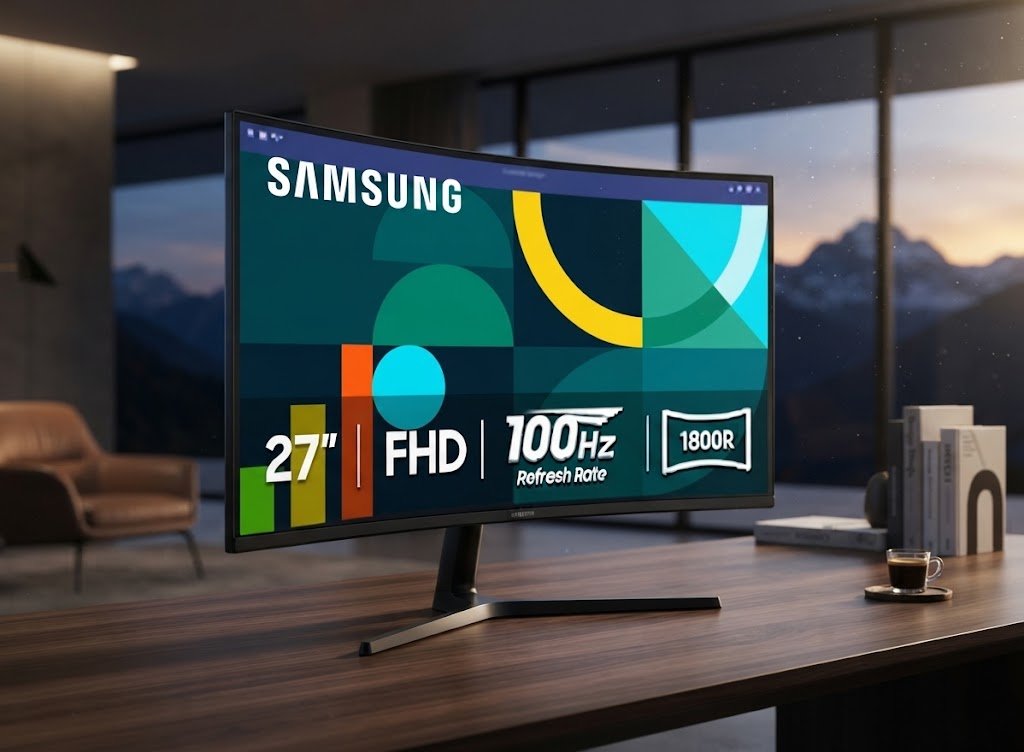
The Samsung 27″ Essential S3 boasts a modern, minimalist design that is visually appealing. The 1800R curvature enhances the immersive experience, drawing viewers into the screen while simultaneously reducing glare and strain. The build quality is commendable for a monitor within its price range, showcasing durability without compromising aesthetic. The slim bezels also contribute to a more expansive viewing area, making it a fitting choice for multi-monitor setups, while its lightweight design ensures easy transportation. Being primarily composed of lightweight yet sturdy materials, it strikes a balance that any tech enthusiast would appreciate.
Real-World Performance
Performance-wise, this monitor excels in various situations, boasting a Full HD resolution of 1920 x 1080 pixels. It operates at an admirable refresh rate of 100Hz, which enhances fluidity during gaming or fast-paced content consumption. Thanks to its Game Mode, users can quickly adjust settings to optimize their experience based on the application in use. This is particularly beneficial for gamers who crave seamless transitions and reduced motion blur. Overall, the Essential S3 promises vibrant colors and sharp contrasts, making it an excellent option for users who appreciate quality visuals. The Advanced Eye Comfort feature is particularly noteworthy, providing a level of eye protection that helps during extended use.
Ease of Use
Setup and usability are areas where Samsung has invested considerable attention. The inclusion of HDMI and D-sub ports ensures versatility when it comes to connecting other devices. Plug-and-play capabilities mean users can start using the monitor almost instantly without the hassle of complicated configurations. Moreover, the intuitive on-screen display (OSD) interface allows for easy adjustments of brightness, contrast, and other settings, catering to users who may not be tech-savvy. Adding to this ease of use is a tilt-adjustable stand that simplifies ergonomic adjustments, promoting better posture during extended usage.
Deep Specs Table
| Specification | Detail |
|---|---|
| Screen Size | 27 inches |
| Resolution | 1920 x 1080 pixels (Full HD) |
| Curvature | 1800R |
| Refresh Rate | 100Hz |
| Ports | HDMI and D-sub |
| Special Features | Game Mode, Advanced Eye Comfort |
Smart Buyer’s Guide
The robust 3-year warranty coupled with Amazon’s 30-day return policy provides an unprecedented safety net for customers. If you encounter any issues, the manufacturer support ensures you won’t be left stranded. The option to return the product if it doesn’t meet your expectations allows for complete peace of mind. This combination of warranty and return policy is what makes online shopping risk-free and reassuring, setting this monitor apart in a sea of gadgets.
Pros and Cons
- ✅ Great Value for Money: Offers high-quality features at a budget-friendly price.
- ✅ Curved Display: The 1800R curvature enhances immersion.
- ✅ Eye Comfort Features: Well-designed for prolonged use with reduced strain.
- ✅ Versatile Connectivity: Includes HDMI and D-sub ports for various devices.
- ❌ Limited Color Range: May not satisfy professional designers needing exact color reproduction.
- ❌ No Built-in Speakers: Lacks integrated audio solution requiring an external setup.
- ❌ Adjustability Limitations: Height adjustment isn’t available, which may affect ergonomics for some users.
Competitor Comparison
| Comparison Criteria | Samsung 27″ Essential S3 (S36GD) | LG 27″ UltraGear (27GN750) | Acer R271U |
|---|---|---|---|
| Top Selling Point | Affordable Curved Design | 144Hz Refresh Rate for Gaming | IPS Panel for Better Color Accuracy |
| Build Quality | Sturdy Yet Lightweight | Premium Build Quality | Adequate Build for Price Point |
| Main Tech Specs | 27″, 1920×1080, 100Hz | 27″, 2560×1440, 144Hz | 27″, 2560×1440, 75Hz |
| Biggest Weakness | Limited Adjustability | Higher Price Point | Limited Refresh Rate |
| Approx. Price | $110 | $399 | $240 |
| Rating | 4.5/5 | 4.8/5 | 4.3/5 |
| Buy Button | Buy Samsung 27″ Essential S3 | Buy LG 27″ UltraGear | Buy Acer R271U |
Why This Deal is Unmissable
Tech Expert’s Verdict
In closing, the Samsung 27″ Essential S3 (S36GD) Curved Monitor emerges as a standout option for anyone in search of a reliable and budget-friendly screen. Its blend of performance, ergonomic benefits, and eye care features makes it a must-have. Whether you’re gaming, streaming, or working, this monitor is more than just an affordable choice; it’s an investment in your visual experience and overall productivity. I wholeheartedly recommend the Samsung Essential S3 for both novice users and tech-savvy enthusiasts alike. Explore more smart home guides at smarthomegen.com to make informed decisions about your tech setup.
FAQs
What is the refresh rate of the Samsung 27″ Essential S3?
The Samsung 27″ Essential S3 offers a refresh rate of 100Hz, which provides smoother performance during fast-paced visuals, making it particularly appealing for casual gaming and action movies.
Does the Samsung 27″ Essential S3 support HDR?
No, the Samsung 27″ Essential S3 does not support HDR. Its focus is on providing good quality FHD visuals while keeping costs low, prioritizing practicality for everyday users.
Is the monitor tilt adjustable?
Yes, the Samsung 27″ Essential S3 allows for tilt adjustments to enhance ergonomics, although it does lack height adjustment features.
Can I use this monitor for professional photo editing?
While the Essential S3 performs well generally, it may not be the best choice for professional photo editing due to its limited color accuracy compared to more advanced IPS panels.
Sources and References
[Amazon Product Link](https://www.amazon.com/SAMSUNG-Essential-Computer-Advanced-LS27D366GANXZA/dp/B0DB9Q5G3R?tag=bego09-20)
[YouTube Video Link](https://www.youtube.com/watch?v=hUXLGcbZuWM)
Disclaimer: As an Amazon Associate, Smart Home Gen earns from qualifying purchases through the links on this page at no extra cost to you.