
Affiliate disclosure: SmartHomeGen earns a commission from qualifying Amazon purchases made through links on this page, at no extra cost to you. Ring changes prices and bundles often, so always check the current price on Amazon before you buy.
Short answer: buy the Ring Battery Doorbell 2K if you want the cheapest way into Ring and don’t mind taking the doorbell off the wall to charge it. Buy the Battery Doorbell 2K Plus if you want the same 2K head-to-toe view with a removable battery and better low-light color, which is the right pick for most homes. Buy the Battery Doorbell 4K Pro only if you’ll actually use 10x zoom, radar-based 3D Motion Detection and Wi-Fi 6, and your home internet has at least 15 Mbps of upload speed.
Ring renamed its battery doorbell lineup around video resolution, so shoppers now search for “Ring battery doorbell 2K vs 4K” and find three similar-looking boxes. This guide explains what really changes between them, what stays the same, and which one fits your door, your Wi-Fi and your budget. If you’re still deciding between Ring and other brands, our best video doorbell guide for 2026 compares Ring with Nest, eufy, Blink and HomeKit options.
Quick picks
- Best value: Ring Battery Doorbell 2K. Retinal 2K (1920 x 1920) head-to-toe video, 6x Enhanced Zoom, built-in battery. Check current price
- Best for most homes: Ring Battery Doorbell 2K Plus. Same 2K view plus a Quick Release Battery Pack, HDR video and Low-Light Sight color night vision. Check current price
- Best for detail and busy streets: Ring Battery Doorbell 4K Pro. Retinal 4K (2880 x 2880), 10x Enhanced Zoom, 3D Motion Detection with radar, Audio+, dual-band Wi-Fi 6 and the larger Quick Release Ultra Battery Pack. Check current price
Ring Battery Doorbell 2K vs 2K Plus vs 4K Pro: comparison table
| Feature | Battery Doorbell 2K | Battery Doorbell 2K Plus | Battery Doorbell 4K Pro |
|---|---|---|---|
| Video resolution | Retinal 2K, 1920 x 1920 | Retinal 2K, 1920 x 1920, HDR | Retinal 4K, 2880 x 2880, HDR |
| Enhanced Zoom | Up to 6x | Up to 6x | Up to 10x |
| Field of view | 140° x 140° head-to-toe | 140° x 140° head-to-toe | 140° x 140° head-to-toe, 5° downward tilt |
| Night vision | Standard night vision | Low-Light Sight (color) + adaptive night vision | Low-Light Sight (color) + adaptive night vision |
| Motion detection | Advanced Motion Detection | Advanced Motion Detection | 3D Motion Detection (radar), Bird’s Eye View and Zones |
| Battery | Built-in rechargeable | Removable Quick Release Battery Pack | Removable Quick Release Ultra Battery Pack |
| Hardwire option | Battery only for most installs | Trickle charge from existing doorbell wires | Trickle charge from existing doorbell wires (8–24 VAC) |
| Wi-Fi | 2.4 GHz | See Ring’s spec sheet for your version | Wi-Fi 6, dual-band 2.4/5 GHz |
| Two-way talk | Two-Way Talk | Two-Way Talk | Two-Way Talk with Audio+ |
| Upload speed Ring recommends | Standard | Standard | 15 Mbps minimum for 4K |
| Who it’s for | Tight budgets, renters, simple porches | Most homeowners | Wide yards, sidewalks, package theft hot spots |
| Price | Check current price | Check current price | Check current price |
What’s the same on all three
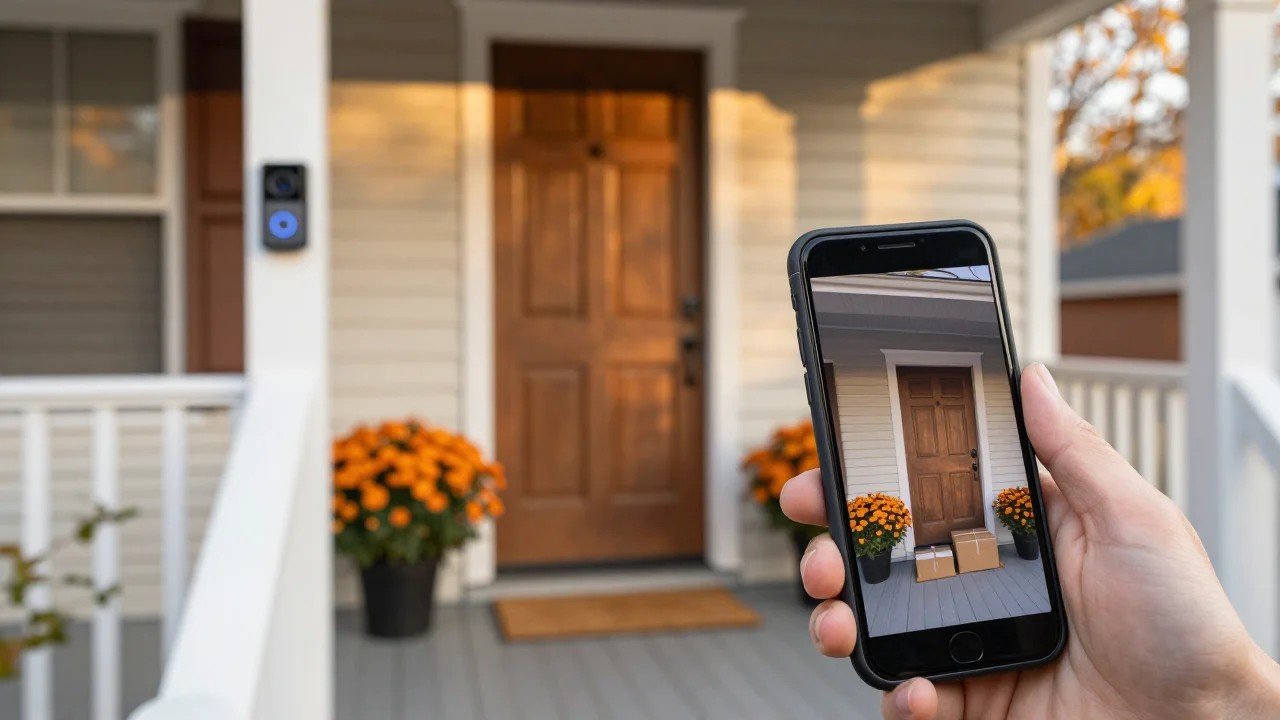
All three Ring battery doorbells give you the same tall, square 140° by 140° head-to-toe view, so you can see a visitor’s face and the package at their feet in the same frame. All of them send real-time phone alerts, support Live View and Two-Way Talk, work with Alexa (you can see who’s at the door on an Echo Show or Fire TV), and run in the same Ring app with privacy zones. They also all need a Ring Home subscription if you want recorded video history, video search and AI features such as Smart Alerts and Video Descriptions. Without a plan, you get live view and alerts but no saved clips.
That’s an important point when you compare prices: the subscription costs the same whichever doorbell you pick, so the hardware difference is the only real price gap.
Ring Battery Doorbell 2K: the budget pick
The base Battery Doorbell 2K is Ring’s most affordable battery doorbell, and the jump to Retinal 2K is a real upgrade over the older 1080p and 1536p models. Faces are clearer at the doorstep, and the 6x Enhanced Zoom is enough to read a delivery uniform or see what’s in someone’s hands.
The trade-off is the battery. It’s built in, so when it runs low you remove the whole doorbell from its mount, charge it indoors over USB, and your front door is unwatched for a few hours. On a quiet street that might mean charging every couple of months, but a busy entrance with lots of motion events drains it faster. It also uses 2.4 GHz Wi-Fi only and basic night vision, which shows black-and-white video after dark.
Choose it if: you rent, you have a small porch with little foot traffic, or you want Ring at the lowest entry cost. Check current price
Skip it if: your door gets constant motion, or you hate the idea of the camera being offline while it charges.
Ring Battery Doorbell 2K Plus: the one most people should buy
The 2K Plus keeps the same Retinal 2K sensor and 6x zoom, but fixes the base model’s biggest annoyance. Its Quick Release Battery Pack slides out of the bottom, so the doorbell stays on the wall while you charge the pack. Buy a spare pack and you never lose coverage. If you have existing doorbell wiring, you can connect it for trickle charging and keep your mechanical chime working.
It also adds HDR, which helps a lot on doors that face the sun or have a bright sky behind visitors, and Low-Light Sight, which keeps video in color in near-darkness when there’s a little porch light or streetlight. That makes night clips far easier to understand than grainy black-and-white footage.
Choose it if: you own your home, want “set it and forget it” charging, or have a door facing bright light. Check current price
Ring Battery Doorbell 4K Pro: when 4K is worth it
The 4K Pro (Ring’s renamed Battery Doorbell Pro 2nd Gen, with the same features) is Ring’s most advanced battery doorbell. Retinal 4K at 2880 x 2880 gives you more than twice the pixels of 2K, and that’s what powers the 10x Enhanced Zoom. The extra detail matters when you zoom into a recording: reading a license plate at the curb, checking a face at the end of a long walkway, or seeing which car stopped in front of the house.
The bigger everyday upgrade, though, is 3D Motion Detection. A small radar measures how far away motion is, so you can draw a line in the app’s Bird’s Eye Zones and only get alerts when someone actually steps onto your path, not when a car drives by. Bird’s Eye View also draws a map of the route a visitor took across your yard. If your doorbell faces a sidewalk or street, this alone can cut false alerts dramatically and save battery.
It also has Audio+ for clearer two-way conversations, dual-band Wi-Fi 6 for a steadier connection when the router is far away, and the larger Quick Release Ultra Battery Pack, which Ring says charges faster and lasts longer.
The catch: Ring recommends at least 15 Mbps of upload speed for its 4K devices. Many cable plans in the US have far less upload than download, so run a speed test from your front door before you buy. If your connection can’t keep up, live view will stutter and you won’t see the benefit of 4K.
Choose it if: you have a deep front yard, face a busy street, deal with package theft, or simply want the best Ring battery doorbell. Check current price
Is 4K actually better than 2K on a doorbell?
For a face standing three feet from the lens, 2K is already sharp, and most people won’t notice a big difference on a phone screen. 4K pays off in three cases: when you zoom into a recording, when the subject is far away (driveway, sidewalk, gate), and when you watch clips on a big screen like a TV or Echo Show 15. If your camera mostly records people at the doormat, the 2K Plus gives you 90% of the experience for less money and less bandwidth.
How to choose: four questions
- How far away is the action? Doorstep only means 2K is enough. Walkway, driveway or street means 4K Pro.
- How busy is the door? Lots of passers-by means you want 3D Motion Detection on the 4K Pro, or at least careful motion zones on the 2K models.
- Do you have doorbell wires? If yes, the 2K Plus and 4K Pro can trickle charge from them and keep your chime. If not, plan on swapping batteries, and the removable pack matters more.
- What’s your upload speed? Under 15 Mbps at the door, stick with 2K.
Installation and setup tips
- Test your Wi-Fi at the door with your phone first. A mesh node or extender near the entrance fixes most Ring connection complaints.
- Use the included wedge or corner kit if your door is set at an angle, so the camera faces the approach, not a wall.
- Set motion zones on day one. It’s the easiest way to stretch battery life and stop pointless alerts.
- Pair it with a smart lock so you can see a visitor and let them in from one app. See our best smart lock guide for Ring- and Alexa-friendly locks.
- Buy a spare Quick Release battery (for the Plus or Pro) and keep it charged inside. Check that it matches your model, because the standard and Ultra packs differ.
Older Ring Battery Doorbell owners: should you upgrade?
If you own the older Ring Battery Doorbell or Battery Doorbell Plus, the newest models mainly give you sharper 2K video and better color at night. That’s a nice upgrade but not urgent if your current one works. Owners of the original Video Doorbell (2nd Gen) or anything 1080p with a narrow view will notice a bigger jump, especially from the head-to-toe view. We covered the previous model in our Ring Battery Doorbell review.
Alternatives worth a look
If you’d rather avoid a subscription, eufy video doorbells with a HomeBase store clips locally. Google Home users may prefer the Nest Doorbell (battery), and Apple Home users should look at HomeKit Secure Video doorbells. We compare all of these in our best video doorbell roundup. For a full Ring setup, the Ring Alarm system and Ring cameras all live in the same app as these doorbells.
FAQ: Ring Battery Doorbell 2K vs 4K
What is the difference between the Ring Battery Doorbell 2K and 4K?
The 4K Pro records at 2880 x 2880 instead of 1920 x 1920, zooms up to 10x instead of 6x, adds radar-based 3D Motion Detection, Audio+, dual-band Wi-Fi 6 and a larger removable Ultra battery. The base 2K has a built-in battery and 2.4 GHz Wi-Fi.
Is the Ring 2K Plus worth it over the regular 2K?
For most people, yes. The removable Quick Release Battery Pack means the doorbell stays on the wall while charging, and HDR plus Low-Light Sight make daytime glare and nighttime clips easier to read.
Does the Ring Battery Doorbell 4K Pro need a subscription?
Live view and motion alerts work without one, but recorded video, video search and AI features need a Ring Home plan. That’s true for every Ring doorbell.
How much internet speed does Ring 4K need?
Ring recommends a minimum upload speed of 15 Mbps for its 4K devices. Test upload speed, not download, at your front door.
Can I hardwire a Ring battery doorbell?
The 2K Plus and 4K Pro can connect to existing doorbell wiring to trickle charge the battery and keep a mechanical chime working. The 4K Pro needs an 8–24 VAC transformer. The base 2K is designed to run on its built-in battery.
How long does the battery last?
It depends on how many events your door gets, motion settings, Wi-Fi strength and cold weather. Quiet doors can go months between charges; busy ones need charging much more often. 3D Motion Detection zones on the 4K Pro help cut unnecessary recordings.
Do the batteries work across models?
Not always. The 2K Plus uses the Quick Release Battery Pack and the 4K Pro uses the Quick Release Ultra Battery Pack. Ring says the Ultra pack also fits the Battery Doorbell Plus (2nd Gen), but check compatibility for your exact model before buying a spare.
Does it work with Alexa and Google Home?
Ring is an Amazon brand, so it works best with Alexa and Echo Show screens. Google Home support is limited, so Google-first homes may prefer a Nest doorbell.
Bottom line
Most US homes should buy the Ring Battery Doorbell 2K Plus for its removable battery and better night color. Go with the 4K Pro if you need zoom detail and radar motion zones and have the upload speed for it, and choose the base 2K when price matters most. See all Ring battery doorbells on Amazon